Menu
#include "chili/menu.hpp"
One chili::Menu class covers title menus, options menus and pause menus.
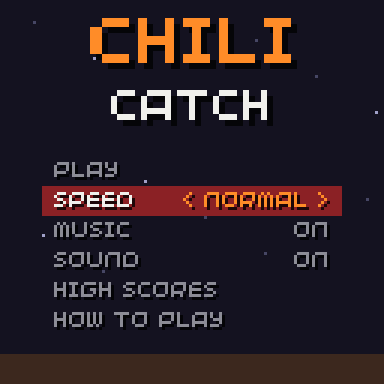
Rows
A menu is a list of rows. There are three kinds:
| Row | Made with | Left/right | A |
|---|---|---|---|
| Action | Menu::action(label, fn) |
nothing | runs fn |
| Toggle | Menu::toggle(label, value, on_change) |
flips the value | flips the value |
| Choice | Menu::choice(label, {options...}, index, on_change) |
steps back / forward, with wrap | steps forward |
- A toggle writes to a
bool &or auint8_t &(0 or 1), so it can point straight at a field of your save struct. - A choice writes the index of the option to a
uint8_t &. on_changeis optional. It runs after the value changed: store the save there, or apply the setting.
Controls
| Button | Does |
|---|---|
| Up / down | Moves the cursor, with wrap-around |
| Left / right | Changes a toggle or a choice |
| A | Runs an action, flips a toggle, or steps a choice forward |
| B | Calls on_back, if set |
Title menu
#include "chili/menu.hpp"
#include "chili/save.hpp"

struct Settings {
  uint8_t speed = 1;
  uint8_t music = 1;
  uint8_t sound = 1;
};
chili::Save<Settings> save(0x48435443, 1);

chili::Menu title{{
  chili::Menu::action("PLAY", [] { scenes.go(play); }),
  chili::Menu::choice("SPEED", {"SLOW", "NORMAL", "FAST"}, save.data.speed, [] { save.store(); }),
  chili::Menu::toggle("MUSIC", save.data.music, [] { apply_settings(); save.store(); }),
  chili::Menu::toggle("SOUND", save.data.sound, [] { apply_settings(); save.store(); }),
  chili::Menu::action("HIGH SCORES", [] { scenes.go(scores); }),
  chili::Menu::action("HOW TO PLAY", [] { scenes.go(help); }),
}};

void update(uint32_t time) {
  title.update();
}

void render(uint32_t time) {
  title.render(Rect(14, 52, 100, 60));
}
render(area) draws one row every row_height pixels (10 by default) from the top of area. The width of area is the width of the highlight bar.
Pause menu
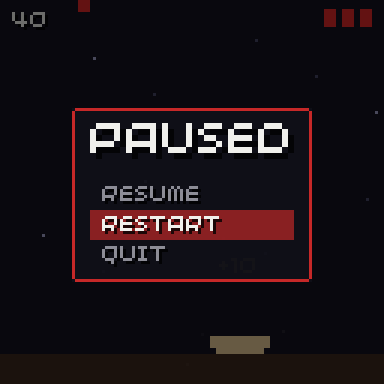
The same class with three actions. on_back lets B close it, like MENU.
chili::Menu pause_menu{{
  chili::Menu::action("RESUME", resume),
  chili::Menu::action("RESTART", restart),
  chili::Menu::action("QUIT", quit),
}};

void init() {
  pause_menu.on_back = resume;
}

void open_pause() {
  pause_menu.select(0);  // always start on RESUME
  paused = true;
}
Reference
| Member | Does |
|---|---|
Menu(std::initializer_list<Item> items) |
Makes a menu from rows. |
bool update(uint32_t pressed = buttons.pressed) |
Handles one frame of input. True when something happened. |
void render(Rect area) |
Draws the background and every row. |
int selected() / void select(int) |
The cursor. select ignores an index out of range. |
int count() / const Item &item(int) |
The rows. |
static std::string value_text(const Item &) |
"ON"/"OFF", the option, or "" for an action. |
std::function<void()> on_back |
Called on B. |
int row_height |
Pixels per row. Default 10. |
A choice index out of range (say, from an old save) shows no value, and the next change brings it back into range.
Sounds
The menu reports what happened through chili::ui_sound: move for up/down, change for a toggle or choice, select for an action and back for B. See Get started: menu sounds.
Restyle it
The default look uses chili::theme. For your own look, subclass and override one or both hooks:
| Hook | Default |
|---|---|
draw_background(Rect area) |
Draws nothing. |
draw_item(const Item &item, Rect row, bool selected) |
A highlight bar on the selected row, the label on the left, the value on the right, < NORMAL > when selected. |
class SnekMenu : public chili::Menu {
public:
  using chili::Menu::Menu;

protected:
  void draw_item(const Item &item, Rect row, bool selected) override {
    if(selected) {
      screen.pen = Pen(70, 150, 80, 150);
      screen.rectangle(row);
      draw_snake_head(Point(row.x - 8, row.y + 2));  // points at the row
    }
    fx::text(item.label, Point(row.x + 4, row.y + 1), selected ? white : grey);
    std::string value = value_text(item);
    if(!value.empty()) fx::text(value, Point(row.x + row.w - 4, row.y + 1), gold, TextAlign::top_right);
  }
};

SnekMenu title{{ /* rows */ }};
Keep the using chili::Menu::Menu; line so the subclass takes the same list of rows.